How remote deposit capture works
Remote deposit capture (RDC) is a bank service. You scan checks, review the images and amounts in the bank's software or web portal, and submit the deposit. The bank clears the checks electronically from the images.
The legal basis is the Check Clearing for the 21st Century Act (Check 21), passed in 2003. It allowed banks to clear checks as images and made a properly produced paper copy of the image, a "substitute check," the legal equivalent of the original. Your deposit agreement with the bank sets the rest: daily and per-deposit limits, cut-off times, when funds become available, how long you keep originals and how you destroy them.
Choose by volume
| Method | Suits | Trade-offs |
|---|---|---|
| Phone app | A few checks a week | Free with most business accounts; slow for batches, with lower deposit limits |
| Single-feed scanner | A handful of checks a day | One check at a time, reliable MICR reading |
| Multi-feed scanner | Dozens or hundreds a day | Feeds a stack; the feeder capacity and speed set the price |
| Bank lockbox | High volume mailed-in payments | The bank receives and deposits the checks for you |
Banks may lend or rent a scanner as part of their RDC service, sometimes with a monthly fee. Compare that with buying one from the bank's approved list, and ask what happens to a rented scanner if you change banks.
Bank compatibility comes first
RDC software talks to the scanner through a driver, and each bank supports a specific list of models. A scanner that is not on the list may not work at all. Before buying:
- Ask the bank for its supported scanner list and the software version it uses.
- Check whether the software runs in a browser, needs a local driver install, or both.
- Confirm your operating system and browser are supported; Mac support is narrower than Windows.
- If you use several banks, look for a model on every bank's list.
An ordinary document scanner will not substitute. Check scanners read the MICR line (the magnetic-ink numbers at the bottom of the check) and produce images in the format banks require.
Specifications that matter
- Feeder capacity. Single-feed for low volume; multi-feed hoppers for batches. Mixed check sizes and folded or torn checks jam cheaper feeders.
- Speed in documents per minute, relevant only for batch volumes.
- MICR read accuracy. Magnetic MICR reading is more reliable than reading the line optically alone. Misreads mean manual corrections.
- Endorsement. Some models print an endorsement on the back of the check as it passes (an inkjet endorser) and saves stamping.
- Image quality and duplex. Both sides are captured in one pass. The bank rejects images that are skewed, dark or cropped.
- ID card scanning. Some models also scan driver's licenses, useful for businesses that record an ID with a check payment.
Risks and controls
- Duplicate presentment. Depositing the same check twice, by scanner and again at a branch, is the most common RDC problem. Mark or file scanned checks so they cannot be deposited again.
- User access. Give each person their own login, and separate who scans from who reconciles where staff numbers allow.
- Returned items. A check that bounces comes back as an image or a substitute check, and your account is debited. Set a routine for following up.
- Security of the PC. The deposit software runs on an ordinary computer. Keep it updated, and lock the stored originals away, for example in a safe.
Related equipment
If you also write checks, the check printers guide covers MICR toner and printing on blank stock. For cash takings, see money counters and coin counters.
Costs people miss
- Bank service fees. Some banks charge a monthly RDC fee or a per-item fee on top of any scanner rental. Ask for the full schedule.
- Endorser ink. Models with an inkjet endorser use cartridges.
- Cleaning supplies. Feed rollers and image glass collect dust and ink; the makers sell cleaning cards, and a dirty scanner produces rejected images.
- Driver updates. A browser or operating system update can break the scanner driver. Check that the model is still supported before upgrading the computer it runs on.
Before you buy
- Sign up for your bank's RDC service and read the deposit agreement.
- Get the bank's supported scanner list and pick from it.
- Choose single-feed or multi-feed by daily check count.
- Compare buying against the bank's rental or monthly fee.
- Set endorsement, storage and shredding routines before the first deposit.
- Decide who scans, who approves and who reconciles.
Check scanners
Affiliate linksMICR check scanners for remote deposit capture. Confirm the model is on your bank's supported list first.

Digital Check
Digital Check TS240-50IJ Check Scanner - 50 DPM, with Inkjet
Panini
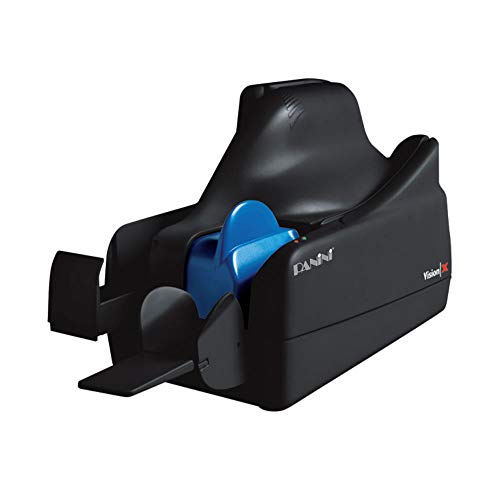
PANINI NORTH AMERICA Vision X50 Single Feed Scanner Panini Check Scanner

Digital Check
Digital Check TellerScan TS250-55IJ Check Scanner
Prices retrieved from Amazon on 2026-09-29 and may since have changed; the price on Amazon at the time of purchase is the one that applies. As an Amazon Associate we earn from qualifying purchases, at no extra cost to you. No manufacturer pays for a place in this list.