Register or POS
The choice turns on two questions: do you need to track stock item by item, and do you want card payments integrated with the sale? If the answer to both is no, a register is cheaper and simpler. If either is yes, look at a POS system.
| Cash register | POS system | |
|---|---|---|
| Up-front cost | A one-time purchase, typically a few hundred dollars | Hardware plus a monthly software fee per station |
| Monthly fees | None for the register itself | Software subscription, add-ons, sometimes hardware rental |
| Inventory | Sales counts by department or PLU | Item-level stock, variants, reorder points |
| Card payments | A separate terminal, amount keyed twice | Integrated, amount sent to the terminal |
| Reports | Printed X and Z reports, sometimes exported to an SD card | Live dashboards from anywhere |
| Internet | Not needed | Needed for most features; offline mode varies |
| Contract | None | Often tied to a processing agreement |
Registers suit farm stands, small retailers, food trucks with a short menu, laundromats, snack bars and any business that wants a cash backup when the internet or the POS fails.
How a register is programmed
- Departments are the basic sales categories: produce, bakery, drinks, service. Each department has its own tax status. Entry-level registers have a handful; larger ones have dozens or more.
- PLUs (price look-ups) are preset items with a fixed price, keyed by number or a dedicated button. The PLU count sets how many products you can ring up by name rather than by keying a price.
- Tax tables. Most registers hold several tax rates, so taxable and non-taxable goods, or goods taxed at different rates, can be rung together. Getting this right is your responsibility, not the register's. Confirm the rates and which goods are taxable with your state or your accountant.
- Clerks. Clerk numbers or keys let you see sales per person and control who can void or refund.
X and Z reports
An X report is a mid-day reading of sales totals. It changes nothing and can be run as often as you like. A Z report is the end-of-day reading: it prints the totals and resets the daily counters to zero, while a running grand total keeps counting.
Z reports are the register's audit trail. Keep them with your daily cash count. Thermal paper fades, so scan or photograph them if you rely on them as records, and ask your accountant how long your state expects sales records to be kept.
Features worth paying for
- Thermal printer. Faster and quieter than the old ink-roller printers, with no ribbon to replace. Check the paper width the register takes; many use narrow 57 or 58 mm rolls.
- SD card or USB export. Lets you back up programming and move sales totals into a spreadsheet or your accounting software.
- Barcode scanner port. Some registers accept a USB or serial barcode scanner linked to PLUs. Check the PLU count is large enough for your catalog.
- Customer display. A rear display showing the price is expected at most counters.
- Lockable drawer with enough slots. Four bill and five coin slots is common. A removable insert lets you swap tills at shift change.
- Battery backup for memory, so a power cut does not wipe programming or the day's totals. A small UPS keeps the register running through a short outage.
Taking cards with a register
A register does not process cards. You add a standalone card terminal from a processor and key the total into it. That works well at low volume. Read the processing contract on its own terms, particularly any equipment lease, as the terminal guide explains.
Costs people miss
- Paper rolls. A busy counter goes through rolls quickly. Buy by the case, and check the roll diameter the register takes as well as the width.
- Programming time. Setting up departments, PLUs, tax rates and clerk codes on a small keypad takes longer than on a POS screen. Some models accept programming from a PC or SD card; others must be keyed in by hand.
- Replacement parts. Keys, drawer inserts and printer parts for budget models can be hard to find after a few years. A widely sold model is easier to keep running.
- Double keying. Keying card totals into a separate terminal takes time and invites errors. Once volume grows, that labor is the argument for a POS.
Before you buy
- Count your departments, PLUs and tax rates, and buy a register with room to spare.
- Check the paper roll width and that rolls are easy to buy.
- Confirm it prints X and Z reports and keeps a grand total.
- Prefer a model with SD or USB export and clerk tracking.
- Plan card acceptance separately, with a terminal you buy rather than lease.
- Set tax rates with your accountant, then test a mixed sale before opening.
Electronic cash registers
Affiliate linksStandalone registers with departments, PLUs, tax tables and X and Z reports. No subscription.
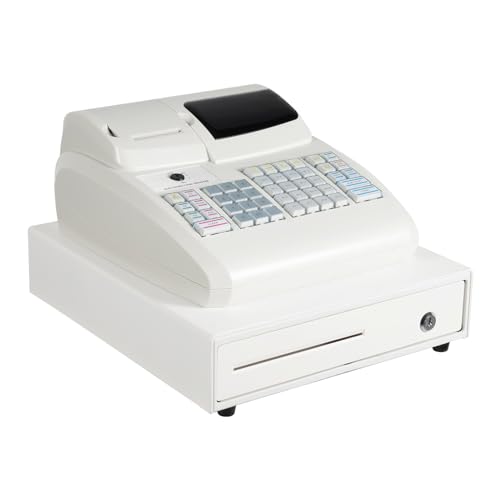
Yykniey
Electronic Cash Register with Thermal Printer, 47 Keys POS System

Royal
Royal Electronic Cash Register, 7000ML, Advanced POS System for Businesses, Ideal for Retail & Small Businesses (Refurbished)

PYY
PYY Cash Register for Small Businesses
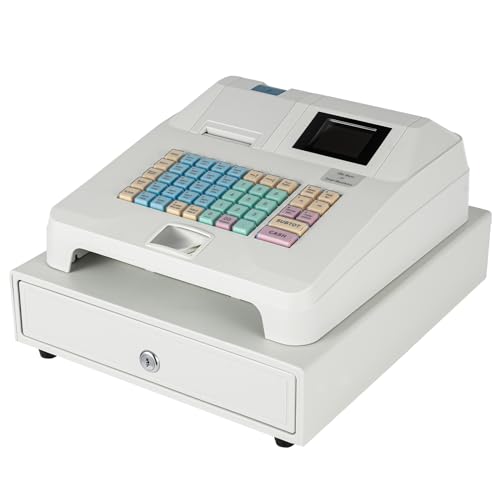
LUPENGSHOP
Electronic Cash Register, POS Casher Thermal Printing Electronic with Receipt and Journal Printers,48 Keys 8 Digital LED Cash Register for Small Business,Retailer,Supermarket,Grocery,Convenience
Prices retrieved from Amazon on 2026-09-29 and may since have changed; the price on Amazon at the time of purchase is the one that applies. As an Amazon Associate we earn from qualifying purchases, at no extra cost to you. No manufacturer pays for a place in this list.
Cash drawers
Affiliate linksPrinter-driven cash drawers open when a receipt prints. Check the cable matches your printer's drawer port.

Oepmoc
16.4" Cash Drawer with Media Slot, POS Cash Register with 5 Bill 8 Coin Slots, RJ11/RJ12 Printer-Driven, 3-Position Key Lock, Heavy-Duty Steel Cash Register for for Small Businesses

HP
HP Cash Drawer - Cash Drawer - 2 Media Slot - 3 Lock Position - Printer Driven - Black - 4.3" Height x 16.3" Width x 16.2" Depth

EOM-POS
EOM-POS Cash Drawer with Brackets, Receipt Printer, for Square Register
Prices retrieved from Amazon on 2026-09-29 and may since have changed; the price on Amazon at the time of purchase is the one that applies. As an Amazon Associate we earn from qualifying purchases, at no extra cost to you. No manufacturer pays for a place in this list.