The folds
Nearly every office folder does letter, Z and half folds. Double parallel and gate folds need more adjustable fold plates, and cross folds need a second fold section. Check the list on the specification sheet against the work you send out.
| Fold | Shape | Typical use |
|---|---|---|
| Letter (C-fold, tri-fold) | Two folds, panels wrap inward | Invoices, statements, letters for a #10 envelope |
| Z-fold (accordion) | Two folds in opposite directions | Letters with the address showing through a window envelope |
| Half (single fold) | One fold down the middle | Programs, cards, four-page newsletters |
| Double parallel | Folded in half, then in half again | Maps, menus, eight-panel brochures |
| Gate | Two outer panels fold in to meet at the center | Invitations and promotional pieces |
| Right-angle (cross) | A second fold at 90 degrees | Posters and large sheets; needs a folder that supports it |
Friction feed or air feed
- Friction feed uses rubber rollers or a wheel to pull the top sheet off the stack. It is simpler and cheaper, and fine for uncoated office paper. It struggles with glossy stock and can scuff or double-feed it.
- Air feed uses a vacuum belt to lift one sheet at a time, with air blown between sheets to separate them. It handles coated, glossy and freshly printed stock far better and marks sheets less. It costs more and is louder.
If you fold brochures from a digital press or a color copier, air feed is usually worth it. Coated sheets from toner printers can be slippery and hold static, the conditions friction feeders handle worst.
Heavy stock and cracking
Folding heavy or coated stock across the grain can crack the surface, leaving a white line through the printed color. Scoring or creasing the sheet first prevents it. Some folders have a scoring wheel; for heavier cover stock a separate creaser is the reliable answer. Check the machine's maximum paper weight, and fold with the grain where you can.
The specifications that matter
- Speed is quoted in sheets per hour, usually for a letter fold on plain paper. Real throughput with setup, coated stock and complex folds is lower.
- Feed tray capacity. A larger tray means fewer refills on a long run.
- Setup. Manual fold plates take a few test sheets each time. Machines with preset fold types or memory for custom jobs save time if you switch jobs often.
- Batch counter and stacker. A counter that stops after a set number helps split runs into mailings; a good stacker keeps folded pieces in order.
- Paper sizes. Check the smallest and largest sheet it accepts, including legal and tabloid if you use them.
- Stapled sets. Some folders can fold a small stapled set of sheets, useful for multi-page letters. Check the maximum.
Desktop, floor-standing or the copier
- Desktop folders suit offices folding a few hundred to a few thousand sheets a month: letters, invoices, newsletters. Most are friction feed, compact and quiet enough to sit near desks.
- Floor-standing and air-feed folders suit print rooms, churches, schools and marketing teams running brochures in the thousands, often on coated stock.
- A copier finisher can letter-fold or half-fold as it prints. If you are replacing a copier anyway, compare the cost of a folding finisher with a separate folder, and remember the finisher only folds what that copier prints.
Keep long hair, ties, lanyards and loose sleeves away from the rollers, and switch the machine off before clearing a jam. The feed rollers are strong enough to pull in more than paper.
Costs people miss
- Feed rollers and tires wear out and need replacing; ask about their price and availability.
- Air-feed machines have belts and vacuum parts that need occasional service.
- Wasted sheets on setup, especially with custom folds.
- A separate creaser if you fold heavy cover stock.
- Service contracts on high-volume machines, often sold by the same dealers as copiers.
Before you buy
- Collect samples of everything you fold and list the fold types.
- Check whether any of it is coated or glossy; if so, look at air feed.
- Estimate monthly volume and your longest single run.
- Confirm the paper size and weight range, and plan scoring for cover stock.
- Decide whether a folder-inserter would remove the envelope step too.
- Run your own samples on a demo machine before committing to a high-volume model.
Related finishing equipment: paper cutters, binding machines and laminators.
Paper folding machines
Affiliate linksDesktop folders for letter, Z and half folds. Air-feed models handle glossy stock better.

Martin Yale
Martin Yale P7500 Paper Folding Machine - Automatic Feed Tabletop 4000 Sheet/Hour Letter, Half, ZFold, Double Parallel, for Offices, Mailrooms, Business, Folds 8.5″ x 11″ & 8.5″ x 14″ 20lb Bond Paper

Martin Yale
Martin Yale P6500 Paper Folding Machine for Letter Size Paper, Manual Feed Automatic Operation, Desktop Letter Folding Machine with Tri Fold and Half Fold, Handles Up to 1,800 Sheets Per Hour
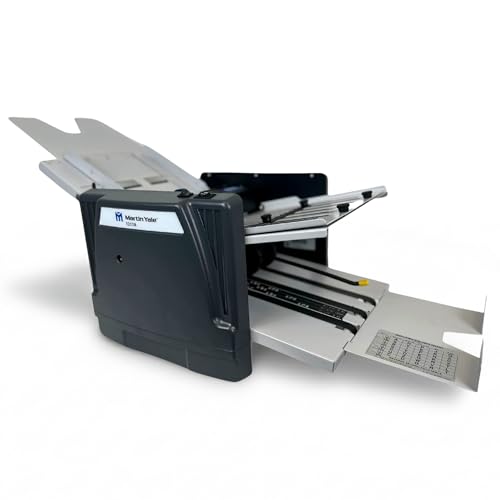
Martin Yale
Martin Yale 1217A Automatic Paper Folder Machine, Medium Duty Auto Feed Document Folder for Offices, Schools, Mailrooms, and Churches, 7 Fold Types, 250 Sheet Capacity, Up to 10,300 Sheets per Hour

Generic
P6500 My Office Products Desktop Paper Folder Folding Machine; Letter or Half Fold; Sets of 1-3 Sheets, 8.5 x 11 Inches, 68 to 90 GSM, 18 to 24 Pounds Bond Paper; 1800 Sheets per Hour
Prices retrieved from Amazon on 2026-09-29 and may since have changed; the price on Amazon at the time of purchase is the one that applies. As an Amazon Associate we earn from qualifying purchases, at no extra cost to you. No manufacturer pays for a place in this list.