Commercial display or consumer TV
A consumer TV is cheaper and looks the same on the wall. The differences show up over years of daily use and when something goes wrong.
| Commercial display | Consumer TV | |
|---|---|---|
| Duty cycle | Rated for long daily hours; many for 16/7 or 24/7 | Designed for a few hours of home viewing |
| Warranty | Commercial warranty for business use, often longer | Often limited or void in commercial use; read the terms |
| Control | RS-232 or network control, scheduling, lock-out of buttons and menus | Remote and consumer apps |
| Startup | Can power on to a chosen input, with no ads or home screen | Smart-TV home screen, updates and prompts |
| Mounting | Portrait options, VESA mounts, slim bezels for video walls | Landscape wall mount |
| Price | Higher for the same size | Lower |
For a huddle room used a few hours a week, a good TV set to a fixed input may be fine, as long as the warranty terms allow business use. For boardrooms, lobbies, digital signage and anything on all day, buy a commercial panel. The ENERGY STAR display register lists certified models, including signage displays, with their on-mode power draw.
Sizing the screen
The common mistake is a screen too small for the room. The size that matters is the height of the image relative to the distance to the farthest seat, and it depends on what people need to read: a video call needs less than a spreadsheet.
The AV industry standard for this is AVIXA's DISCAS (Display Image Size for 2D Content in Audiovisual Systems). An integrator can apply it to your room. As a quick test before buying, open your usual spreadsheet or slide deck on a screen of the candidate size and read it from the back seat. If the text is hard to read, go bigger or use two screens.
- Two screens in a video room let people see the remote participants and the shared content at the same time.
- Projectors still make sense for very large rooms, where flat panels become costly or too heavy for the wall.
- Resolution: 4K is standard on commercial panels at meeting room sizes and helps with fine text at close range.
Video conferencing
Most rooms now pair the display with a video bar (camera, microphones and speakers in one unit) mounted above or below the screen, or a larger system with ceiling microphones for big tables.
- Room systems run Microsoft Teams Rooms, Zoom Rooms or Google Meet hardware and join meetings with one touch. Check which platform your company uses and buy hardware certified for it.
- USB bring-your-own-device setups let a laptop use the room camera and microphones. Cheaper and flexible, but every meeting starts with cables and settings.
- Room licenses for Teams Rooms or Zoom Rooms are a recurring cost, separate from the hardware.
Interactive flat panels
Touch displays with built-in whiteboard software suit training rooms, classrooms and design reviews. They cost more than a plain panel and are only worth it if people will stand up and use them. Check how whiteboard content is saved and shared, and whether the panel's built-in computer will get security updates for as long as you keep it. Many buyers add a separate, managed computing module instead.
Costs people miss
- Installation: mounting, power and data at the right height, and cable management behind the wall.
- Wireless presentation hardware or casting setup, and making it work on a guest network.
- Room system licenses and support, renewed yearly.
- Acoustic treatment. Hard, echoey rooms defeat good microphones.
- Energy: a panel left on all day draws power all day. Use scheduling or auto-sleep.
Before you buy
- Measure the distance to the farthest seat and decide what people need to read.
- Choose a commercial panel for daily or all-day use.
- Confirm which video platform you use and buy certified hardware for it.
- Decide if touch is needed or a plain display will do.
- Check the wall, the mount and the ADA protrusion limit where people walk past.
- Budget installation, licenses and support alongside the screen.
For desk screens, see the guide to business monitors. Rooms that record or transcribe meetings raise their own questions, covered in AI notetakers. The form on this page passes your request to an installer when one serving your area is available.
Video conference bars
Affiliate linksCamera, microphones and speakers in one unit for small and mid-size rooms. Check certification for your platform.

Yealink
Yealink A10-020 All-in-One Video Conferencing System with CTP18 Touch Panel

Yealink
Yealink UVC34 4K Video Conference Camera System for Huddle Meeting Rooms

PLT
Poly Studio R30 4K Video Conference System - Camera, Mic, and Speaker Bar for Small Rooms - Presenter Tracking, NoiseBlockAI, Framing - Plug & Play - Works w/Teams, Zoom & More

Plantronics
Poly Studio X70 Video Bar + TC8 Touch Controller (Plantronics + Polycom) - 4K Audio & Video Conferencing for Large Conference Rooms - Camera, Speakers, Mics - Works with Teams, Zoom & More (Renewed)
Prices retrieved from Amazon on 2026-09-29 and may since have changed; the price on Amazon at the time of purchase is the one that applies. As an Amazon Associate we earn from qualifying purchases, at no extra cost to you. No manufacturer pays for a place in this list.
Display wall mounts
Affiliate linksCheck the VESA pattern and weight rating, and fix into studs or blocking. Low-profile mounts help with ADA protrusion limits.

USX MOUNT
USX MOUNT Fixed TV Wall Mount with Low Profile for Most 26-55 Inch LED, LCD and Flat Screen TVs, TV Mount Bracket with VESA Up to 400x400mm and Weight Capacity 99lbs,and Space Saving TV Bracket

USX STAR
85 86 98 100 inch Heavy Duty Tilt TV Wall Mount Bracket for 65-120 inch Large TVS Up to 220LBS, Tilting TV Mount, Max VESA 900×600mm, 16/18/24/32" Studs, Fit Most 65+ 75+ 120 TVs

monTEK
monTEK 1.1-Inch Ultra Slim Full Motion TV Wall Mount for 43-90 Inch TVs
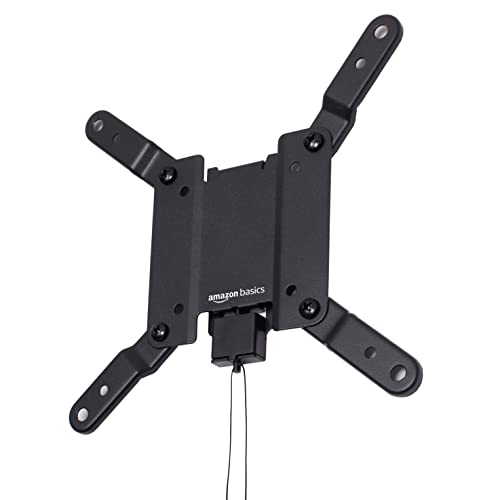
Amazon Basics
Amazon Basics Fixed Flat TV Wall Mount, Low Profile, for 12" to 40" TVs, VESA 200x200, 40 lbs Capacity, with Installation Template, Black
Prices retrieved from Amazon on 2026-09-29 and may since have changed; the price on Amazon at the time of purchase is the one that applies. As an Amazon Associate we earn from qualifying purchases, at no extra cost to you. No manufacturer pays for a place in this list.