The three ways to run a phone system
- Hosted VoIP or UCaaS (unified communications as a service). The provider runs the phone system in its data centers. You pay a monthly fee per user and plug phones into your network. UCaaS bundles calling with video meetings, chat and often SMS and a mobile app. Nothing to maintain on site, and adding a user takes minutes.
- On-premise IP PBX. You buy the system (an appliance or software on a server) and connect it to the phone network through SIP trunks from a carrier. Higher up-front cost, lower monthly cost, and full control. You or a dealer handle updates, security and repairs.
- Calling built into your collaboration suite. Microsoft Teams and Google Workspace both sell add-on phone numbers and calling. It suits offices where people already live in those apps and few use desk phones.
How to choose
For most offices under about 100 people, a hosted system is the default. The monthly fee replaces hardware refreshes, maintenance and the staff time to run a PBX, and it keeps working for remote staff with no extra setup. An on-premise system makes more sense when you already have one and the staff to run it, when you need integration with equipment on site (paging, door phones, a hotel or hospital system), or when a fixed cost over many years beats a per-user fee that rises with headcount.
Ask each provider or dealer the same questions:
- What the per-user price includes: auto-attendant, call queues, call recording, SMS, fax, analytics.
- Whether prices rise after a first-year promotion, and the term and early-termination terms.
- Taxes and regulatory fees on the bill. They can add a noticeable share on top of the headline price.
- How number porting works, and that you can take your numbers with you when you leave.
- How the system meets the 911 rules below.
The network a phone system needs
VoIP call quality depends on your network more than on the provider. A call with the common G.711 codec uses roughly 100 kb/s in each direction, so bandwidth is rarely the problem. Delay and jitter are. What helps:
- A voice VLAN and quality of service on the switch and router, so calls go first. That needs a managed or smart switch; see the network switch guide.
- PoE ports for desk phones, so each phone needs one cable and no power brick.
- A second internet connection with automatic failover if the phones are how customers reach you. Most hosted systems can also forward calls to mobiles when the office is offline.
- A UPS on the router and PoE switch. When they lose power, the desk phones go dead. The UPS sizing guide covers the math.
Handsets
Many staff will be fine with a softphone app on a computer and a headset. Desk phones still suit reception, shared desks, warehouses and anyone who takes calls all day. Before buying handsets, confirm the provider supports the model; many hosted providers support a short list or sell their own. Cordless DECT phones cover warehouses and shop floors better than Wi-Fi phones. The telephone register lists desk phones with their power data.
911 rules for multi-line phone systems
Two federal laws apply to multi-line telephone systems of the kind most offices use. The FCC enforces both.
- Kari's Law. A multi-line system manufactured, imported, sold, leased or installed after February 16, 2020 must let anyone dial 911 directly, with no "9" or other prefix first. It must also send a notification to a central point, such as reception or security, when someone dials 911, where the system can do so without a major upgrade.
- RAY BAUM'S Act. Under the FCC rules that implement it, a 911 call from such a system must carry a dispatchable location: the street address plus details such as floor, suite or room that let responders find the caller. Softphones and phones that move between locations are included, which makes location settings for remote staff part of the setup.
Obligations fall on manufacturers, sellers, installers and operators in different ways. In practice, ask the provider or dealer how their system meets both rules, keep location records up to date when people move, and test 911 notification with your local 911 center's guidance on test calls. Several states have their own rules on top. Check with a lawyer if you are unsure what applies to you.
The costs people miss
- Per-user fees for shared devices: conference phones, lobby phones and fax lines often count as users.
- Toll-free minutes, international calls and SMS registration fees for business texting.
- Handset replacement every five to seven years, and headsets for staff on softphones.
- For on-premise systems: support contracts, SIP trunk fees, and the server or appliance refresh.
- The switch, UPS and backup internet line that make the system reliable.
If you are thinking about an AI system to answer calls, see AI receptionists; most connect to a hosted phone system.
Before you buy
- Count users, shared phones, remote staff and locations.
- Decide hosted, on-premise or collaboration-suite calling.
- Get the full monthly price with taxes, fees and any post-promotion rate.
- Confirm direct 911 dialing, central notification and dispatchable location for every phone type.
- Check your switch supports PoE and a voice VLAN, and put it on a UPS.
- Plan failover for internet outages.
- Confirm number porting and the contract exit terms in writing.
VoIP desk phones
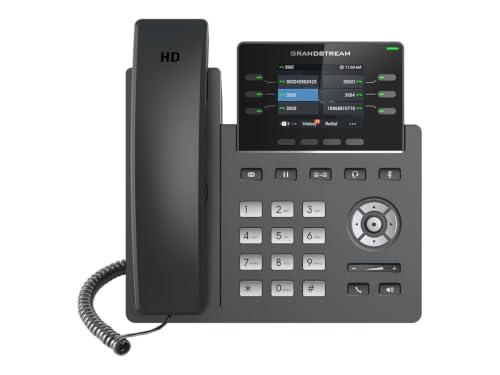
Affiliate linksSIP desk phones with PoE for hosted and on-site phone systems. Confirm your provider supports the model before buying.
Grandstream
Grandstream GRP2613W IP Phone | 6 Lines, 6 SIP Accounts | 2.8-Inch Color Display | Wi-Fi 6 | Dual-Port Gigabit Ethernet with Integrated PoE

Grandstream
Grandstream GXP1630 IP Phone, 3 Lines, 3 SIP Accounts, 2.9-Inch LCD Display, Dual-port Gigabit Ethernet with Integrated PoE

Grandstream
Grandstream Cordless WiFi IP Phone WP826 SIP Phone

Grandstream
Grandstream GRP2616 IP Phone | 6 Lines, 6 SIP Accounts | 4.3-Inch Color Display | Wi-Fi 5 | Dual-Port Gigabit Ethernet with Integrated PoE
Prices retrieved from Amazon on 2026-09-29 and may since have changed; the price on Amazon at the time of purchase is the one that applies. As an Amazon Associate we earn from qualifying purchases, at no extra cost to you. No manufacturer pays for a place in this list.
Office headsets
Affiliate linksWired and wireless headsets for softphones and desk phones, for staff who take calls all day.

JIAMQISHI
JIAMQISHI USB Headset with Microphone for PC, On-Ear Computer Laptop Headphones with Noise Cancelling Microphone in-line Control for Home Office Online Class Skype Zoom (USB+3.5mm, Black)

Jabra
Jabra Evolve 10 Wired USB Headset with Noise-Cancelling Mic, Black

Lenovo
Lenovo USB-A Wired Stereo Headset for PC/Laptop, AI Noise Canceling via APP, 140g Lightweight, Replaceable Earcups, Double-Sided Boom Mic, in-line Controls with Mute for Call. Work with Teams/Zoom

Soothielec
Wireless Headset with Mic for Work, Bluetooth Headset with Noise Cancelling
Prices retrieved from Amazon on 2026-09-29 and may since have changed; the price on Amazon at the time of purchase is the one that applies. As an Amazon Associate we earn from qualifying purchases, at no extra cost to you. No manufacturer pays for a place in this list.